Node Exporter Service
How to install Node Exporter as a Service on Ubuntu 24.04
Ubuntu - Node Exporter Service
Introduction
This guide will provide instructions on how to install Node Exporter as a service in Ubuntu 24.04.
- What is node_exporter?
Prerequisites
Prometheus should be set up. Grafana should be connected to your Prometheus instance.
Download and Install node_exporter
Navigate to the node_exporter download and locate the release with the "Latest" tag. At the time of this wiki that is node_exporter-1.8.2.linux-amd64.tar.gz and it will be used as an example in future commands within this wiki.
Download the latest version to the home directory
wget -P ~/ https://github.com/prometheus/node_exporter/releases/download/v1.8.2/node_exporter-1.8.2.linux-amd64.tar.gzExtract the downloaded file
tar -xvf ~/node_exporter-1.8.2.linux-amd64.tar.gzMove the extracted files
sudo mv ~/node_exporter-1.8.2.linux-amd64/node_exporter /usr/local/bin/Remove the unneeded files
rm -rf ~/node_exporter-1.8.2.linux-amd64*Create the node_exporter user
sudo useradd -r -s /bin/false -c "Node Exporter service account" -d /nonexistent node_exporter- '-r': Creates a system account with a UID < 1000, typically used for system services.
- '-s /bin/false': Disables shell access for the user.
- '-c' "Node Exporter service account": Adds a comment for clarity.
- '-d /nonexistent': Sets the home directory explicitly to a non-existent directory, further ensuring the account is restricted.
Set the user permissions
sudo chown node_exporter:node_exporter /usr/local/bin/node_exporterCreate the service
sudo nano /etc/systemd/system/node_exporter.serviceAdd the following configuration, then press ctrl + x, then y, then enter to save.
[Unit]
Description=Node Exporter
Wants=network-online.target
After=network-online.target

[Service]
User=node_exporter
Group=node_exporter
Type=simple
ExecStart=/usr/local/bin/node_exporter

[Install]
WantedBy=multi-user.target
Reload the daemon
sudo systemctl daemon-reloadStart the service
sudo systemctl start node_exporterEnable service to start on boot
sudo systemctl enable node_exporterVerify the status
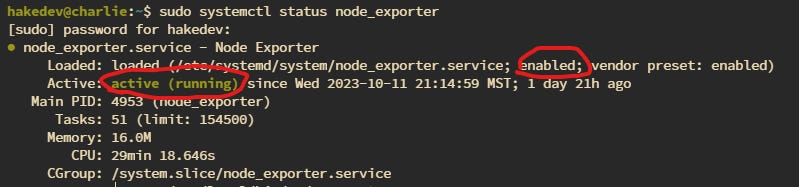
sudo systemctl status node_exporterYou should see it is enabled and active
Update Prometheus Config
Update the Config
Open up the prometheus config
sudo nano /etc/prometheus/prometheus.ymlThen add a new job for node_exporter
  - job_name: 'node_exporter'
    static_configs:
      - targets: ['localhost:9100']
        labels:
          instance: '<hostname>'
If the PC that you are installing node_exporter on is not the host that is running prometheus, then you should use the IP of the host that you are installing node_exporter on instead of localhost.
Restart the prometheus service
sudo systemctl restart prometheusVerify Target is Up
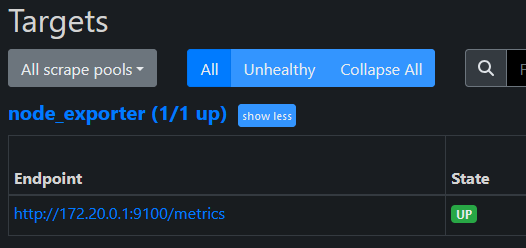
To be sure the node_exporter target was loaded, check the web frontend for Prometheus. Click the "Status" menu item in the navbar and then the "Targets" menu item to see all connected targets
Importing the Dashboard
There is a default dashboard that you can import to get started. Open up Grafana, go to "Dashboards" and then click the button "New", from the dropdown select "Import". Then enter 1860 where it says "URL or ID". Then click "Load"
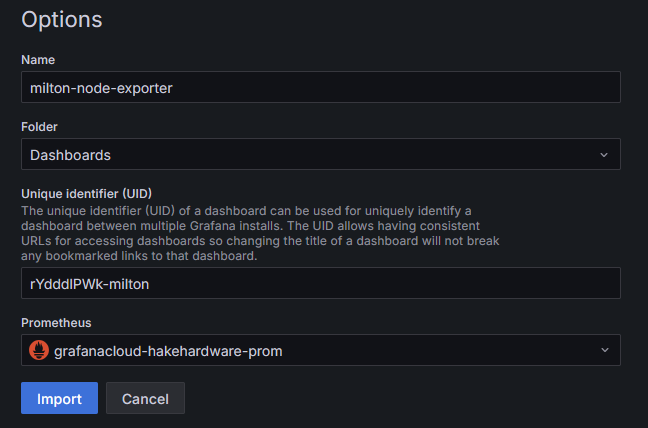
I usually make the name a bit more descriptive and change the UID slightly as well. Then select the Prometheus data source you set up. Finally click "Import"
You should see the dashboard load with the default layout.
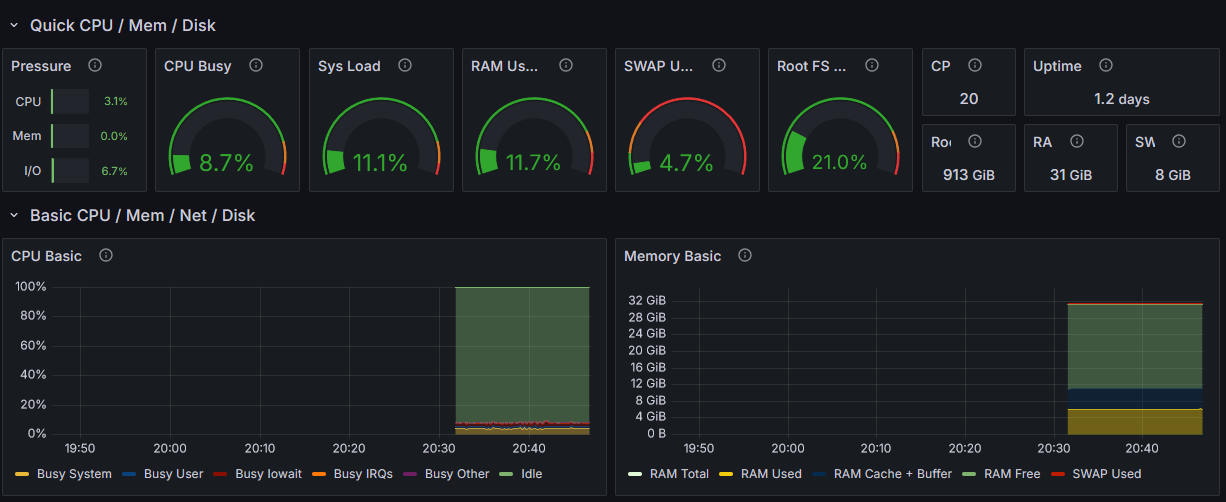
And that's it! You can now monitor your PC easily from anywhere. You can even add alerts and other cool things, but that is outside the scope of this guide.