Blog
Minisforum N5 Air Review: More Power Than You Expect From a Barebones NAS
The N5 Air packs a surprising amount of power and expandability into a barebones NAS. The Ryzen 7 255 outperforms processors in NAS units costing significantly more, and the cooling keeps it running without throttling. The slide-out…
This post contains paid links (affiliate) — how that works.
Contents
- Specifications
- What Barebones Means
- Build Quality and Design
- Internal Layout
- Cooling and Noise
- NVMe Slot Analysis
- Storage Performance
- ZFS RAID-Z2 Pool (5x HDD, JMicron JMB58x SATA controller)
- NVMe Storage
- Network Performance
- Power Consumption
- CPU Performance
- Thermal Profile
- Who Is This For
- Rack score
- Pros
- Cons
- Gear used
The Minisforum N5 Air is a 5-bay NAS built around an AMD Ryzen 7 255 processor with 10GbE plus 5GbE networking, a PCIe x16 expansion slot, OCuLink, and USB4. As a barebones unit, it packs more features and raw processing power than NAS units costing two to three times as much. The tradeoff is a plastic chassis and some build quality compromises. After a full teardown and benchmark suite, here is what stands out and what falls short.
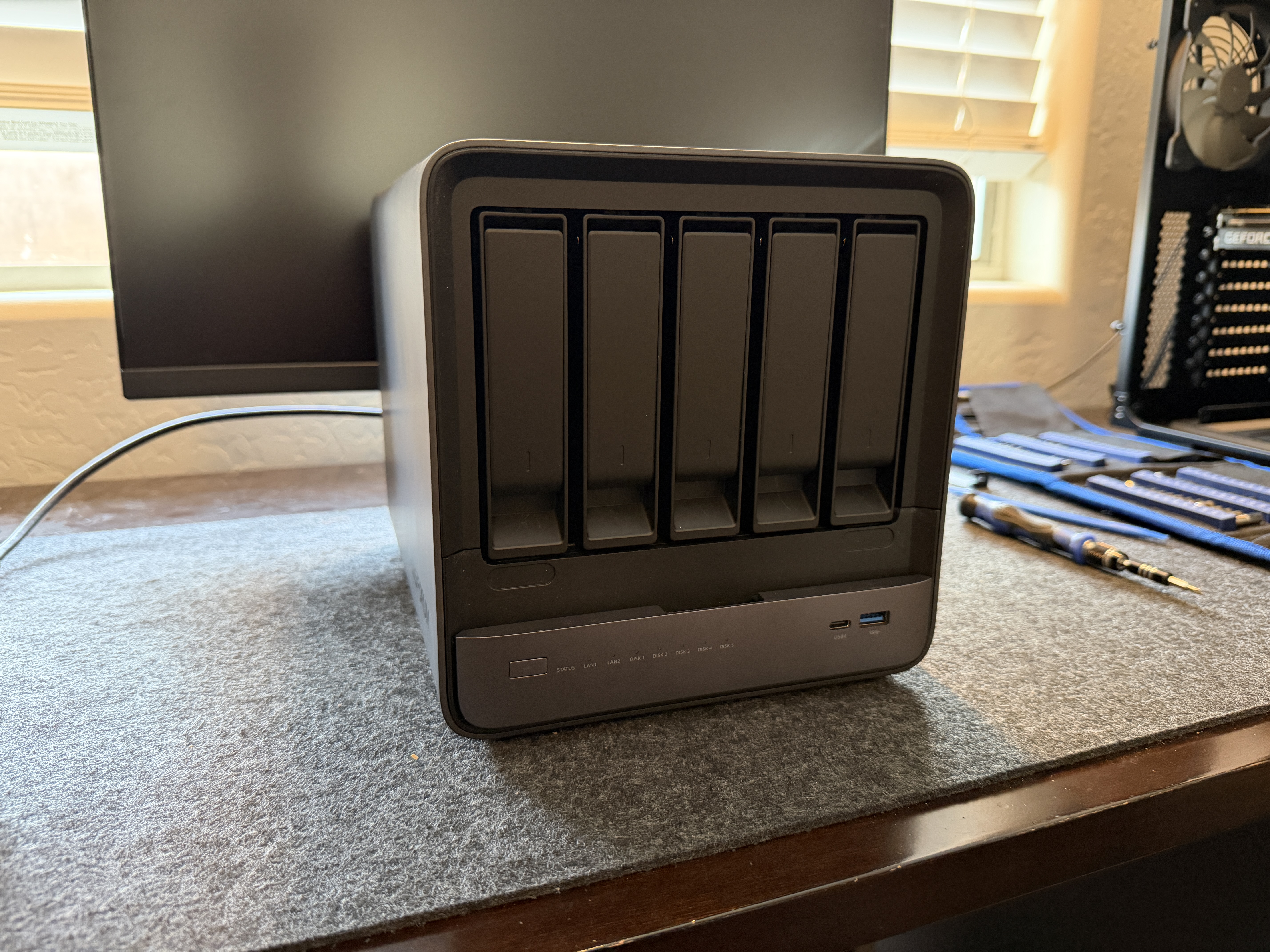
Specifications
| Component | Details |
|---|---|
| CPU | AMD Ryzen 7 255 (8C/16T, up to 4.97GHz, 45W TDP) |
| GPU | AMD Radeon 780M (integrated) |
| RAM | Barebones, DDR5 SO-DIMM (max 96GB, 2 slots, up to 5600MHz) |
| Drive Bays | 5x 3.5"/2.5" SATA with tool-less trays |
| M.2 Slots | 3x NVMe (Slot A: PCIe 4.0 x4, Slot B: PCIe 4.0 x2, Slot C: PCIe 2.0 x1) |
| Stock Drive | 64GB eMMC-class NVMe (pre-installed with MinisCloud OS) |
| Networking | 1x 10GbE (Realtek RTL8127) + 1x 5GbE (Realtek RTL8126) |
| USB | 2x USB4 (40Gbps), 1x USB 3.2 Gen 2, 1x USB 2.0, 1x internal USB 3.2 Gen 2 |
| Video | HDMI (8K@60Hz / 4K@144Hz) |
| Expansion | PCIe x16 slot (PCIe 4.0 x4 electrical), OCuLink (PCIe 4.0 x4) |
| Power | DC 19V external adapter |
| Dimensions | 199 x 202 x 252mm |
| Fans | 2x 92mm rear exhaust + 1x NVMe cooling fan |
What Barebones Means
The N5 Air ships with no RAM and no hard drives. The only storage included is the 64GB eMMC-class boot drive pre-loaded with MinisCloud OS. Before this device is usable, you need to purchase:
- DDR5 SO-DIMM RAM -- at minimum one stick, though two for dual-channel is recommended. Budget at least 16GB for basic NAS use, 32GB or more if you plan to run Proxmox, Docker, or ZFS.
- Hard drives or SSDs for actual storage -- the 5 SATA bays are empty.
- An NVMe drive (recommended) -- the stock 64GB boot drive is a slow eMMC-class chip on PCIe 2.0 x1. It is adequate for booting an OS, but if you plan to run containers, VMs, or anything beyond basic file serving, you will want a proper NVMe drive in Slot 1 for your workloads.
Factor these costs into your purchase decision. The advertised price gets you the enclosure, motherboard, and CPU, but the total cost of a usable system is significantly higher.
Build Quality and Design
The N5 Air has a plastic outer shell with a matte finish. It is well-constructed plastic, thick and cleanly molded, but plastic nonetheless. Pick it up and you immediately notice it is lighter than a metal-chassis NAS. The drives are noticeably louder through the plastic walls than they would be in a metal enclosure.
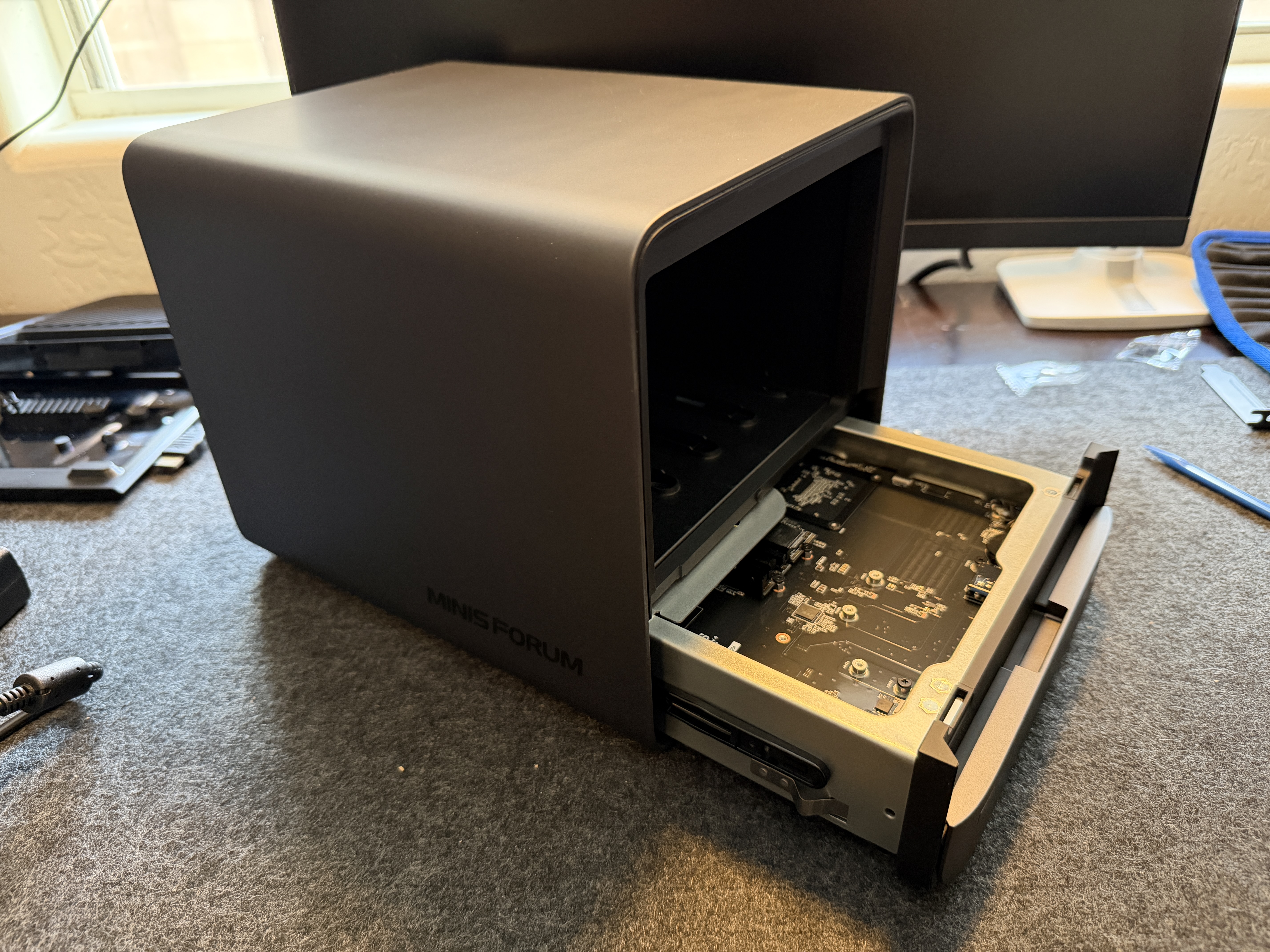
The standout design feature is the slide-out motherboard tray. Remove two screws from the bottom and the entire motherboard slides out from the front of the chassis on a metal tray. This gives you immediate access to the CPU cooler, RAM, all three NVMe slots, and the PCIe x16 expansion slot. It is genuinely one of the best internal access designs in this product category.
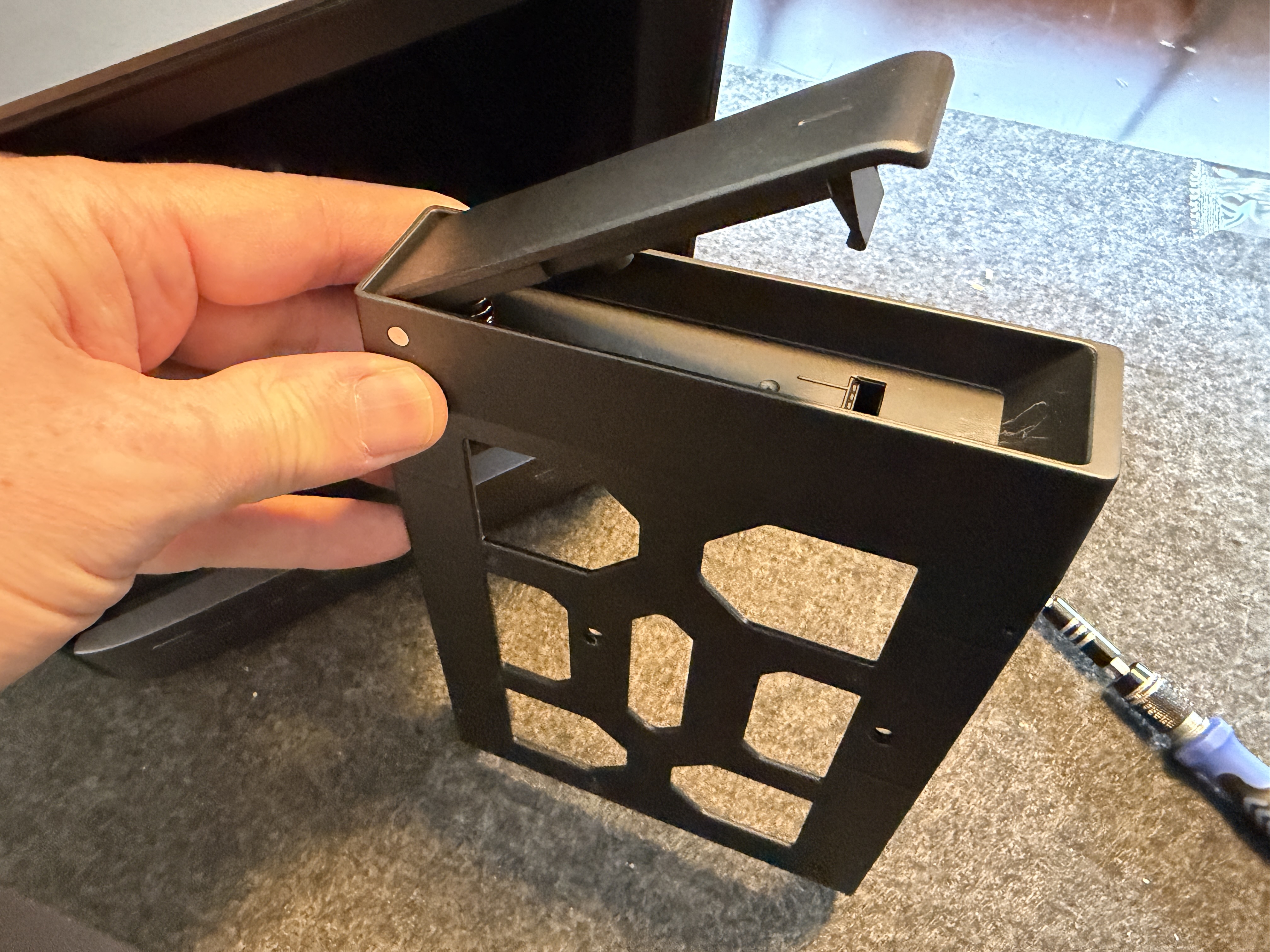
The drive trays are the weakest point. They use an interference-fit clip system that requires significant force to operate. The pull tabs are difficult to grip and I found myself reaching for a flathead screwdriver every time. The clips snap into place with an audible click, and it is easy to imagine them wearing out over years of drive swaps. The trays do include rubber vibration dampening pads, which is a nice touch, but the overall mechanism feels like a cost-saving decision that undermines an otherwise thoughtful design.
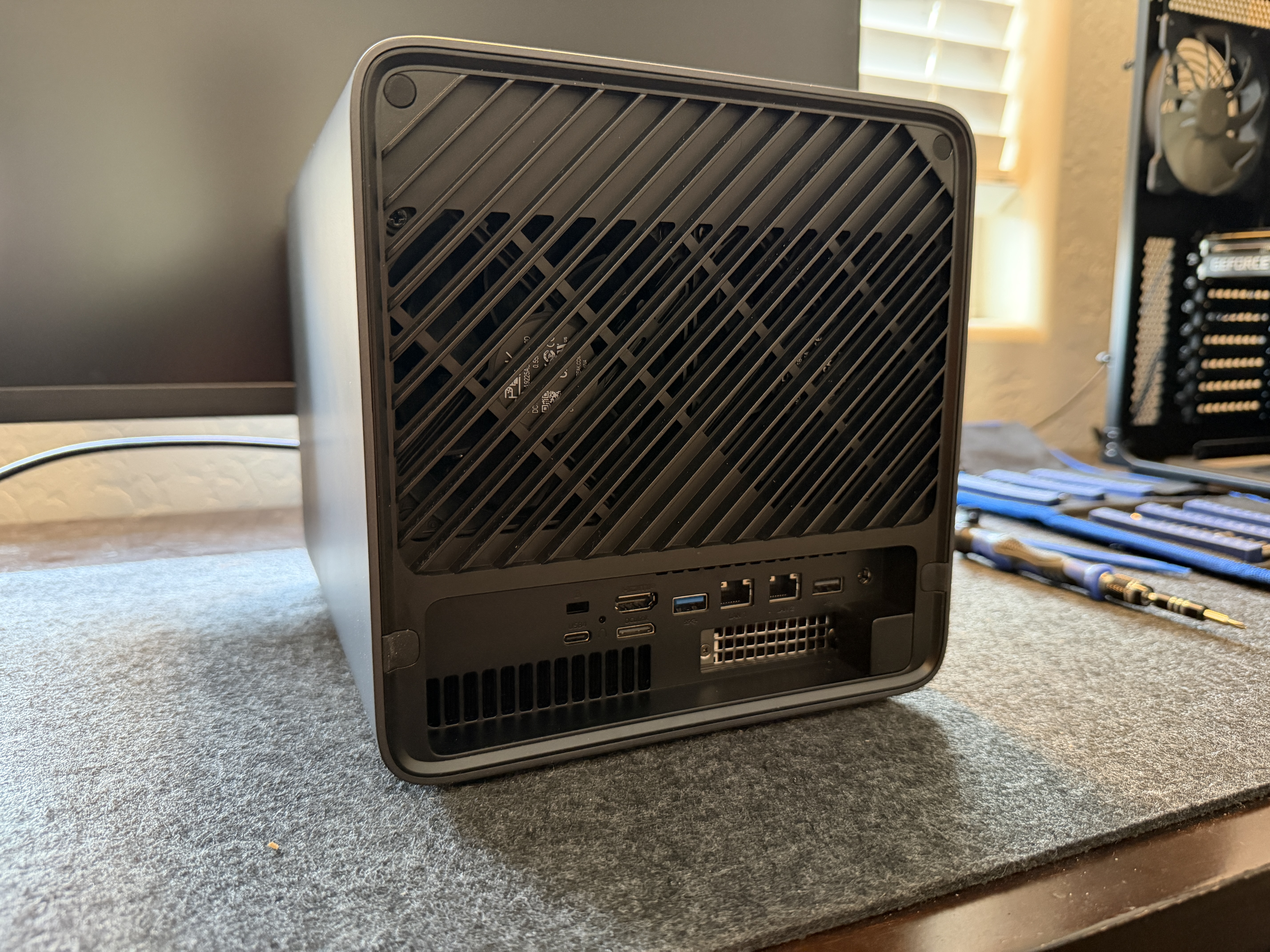
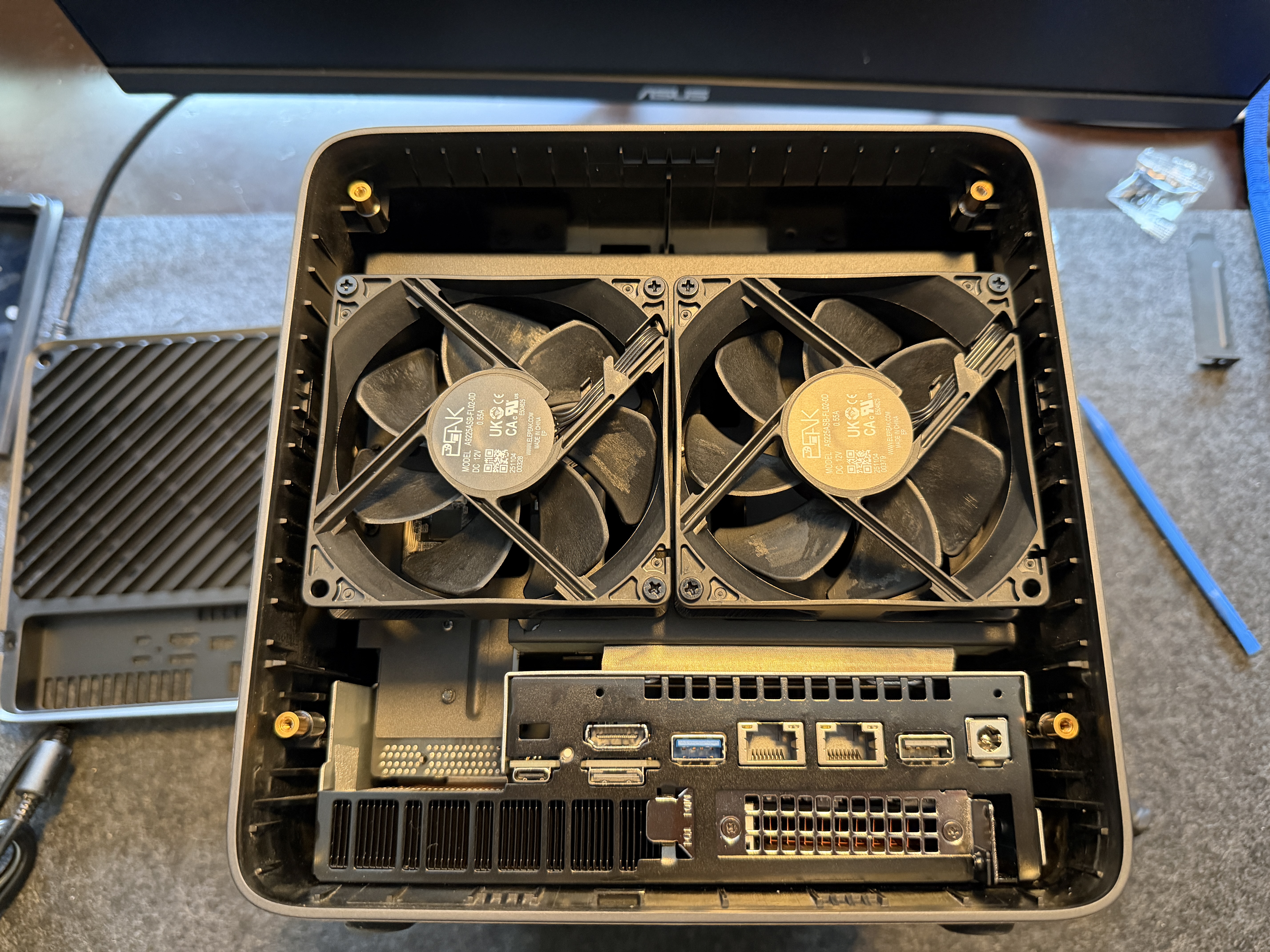
The rear panel has a diamond-pattern ventilation grille over the dual fans, with all I/O ports arranged below. The magnetic front panel covers the drive bays and snaps on and off cleanly. I tested drive temperatures with the panel on and off during sustained I/O and found no meaningful difference, so it is purely cosmetic.
Internal Layout
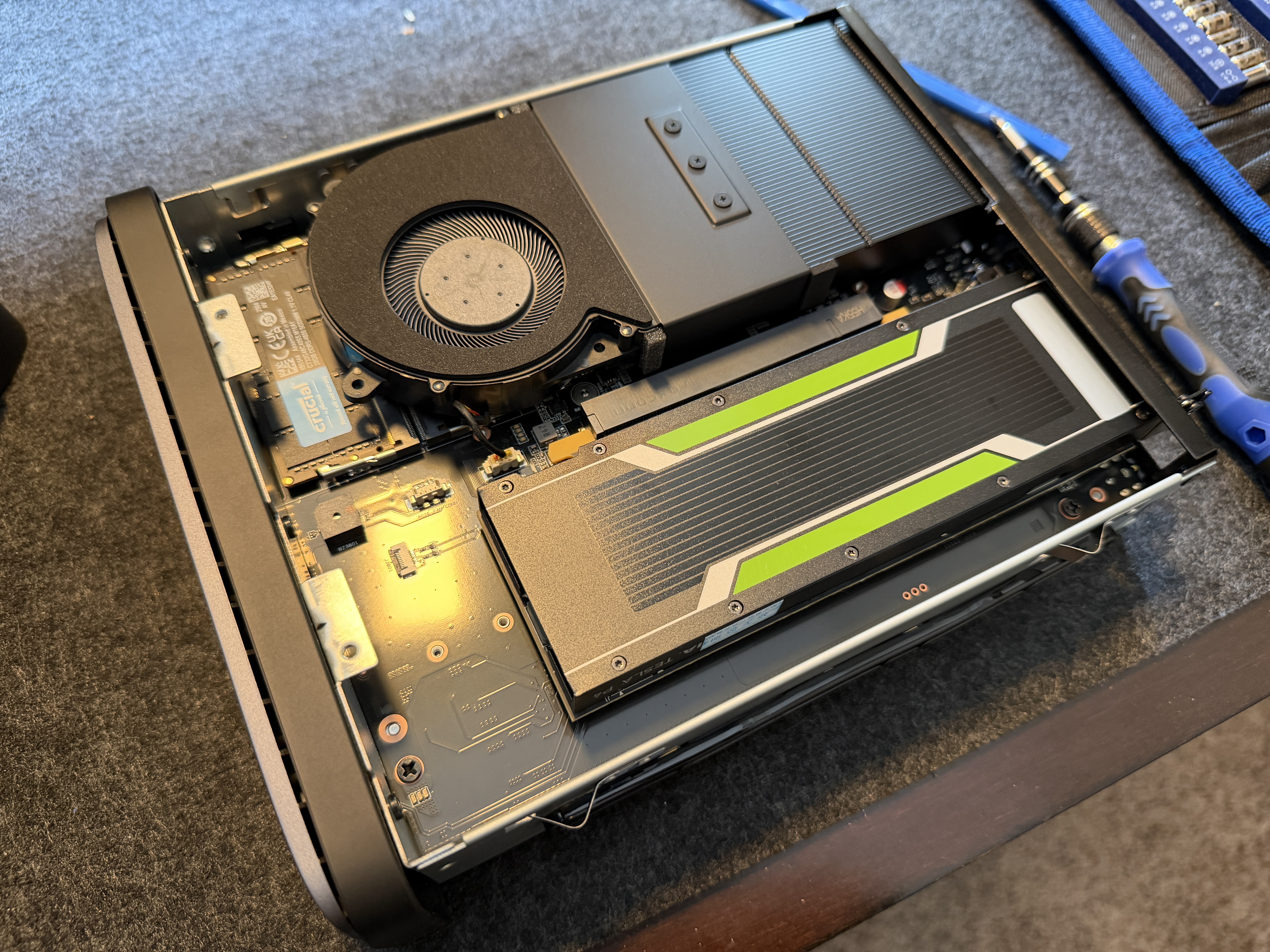
With the motherboard tray slid out, the layout is dense but accessible. The CPU sits under a blower-style cooler with a heatpipe heatsink array. The PCIe x16 slot runs alongside it, and the DDR5 SO-DIMM slots sit beneath the cooler shroud, accessible by removing three screws.
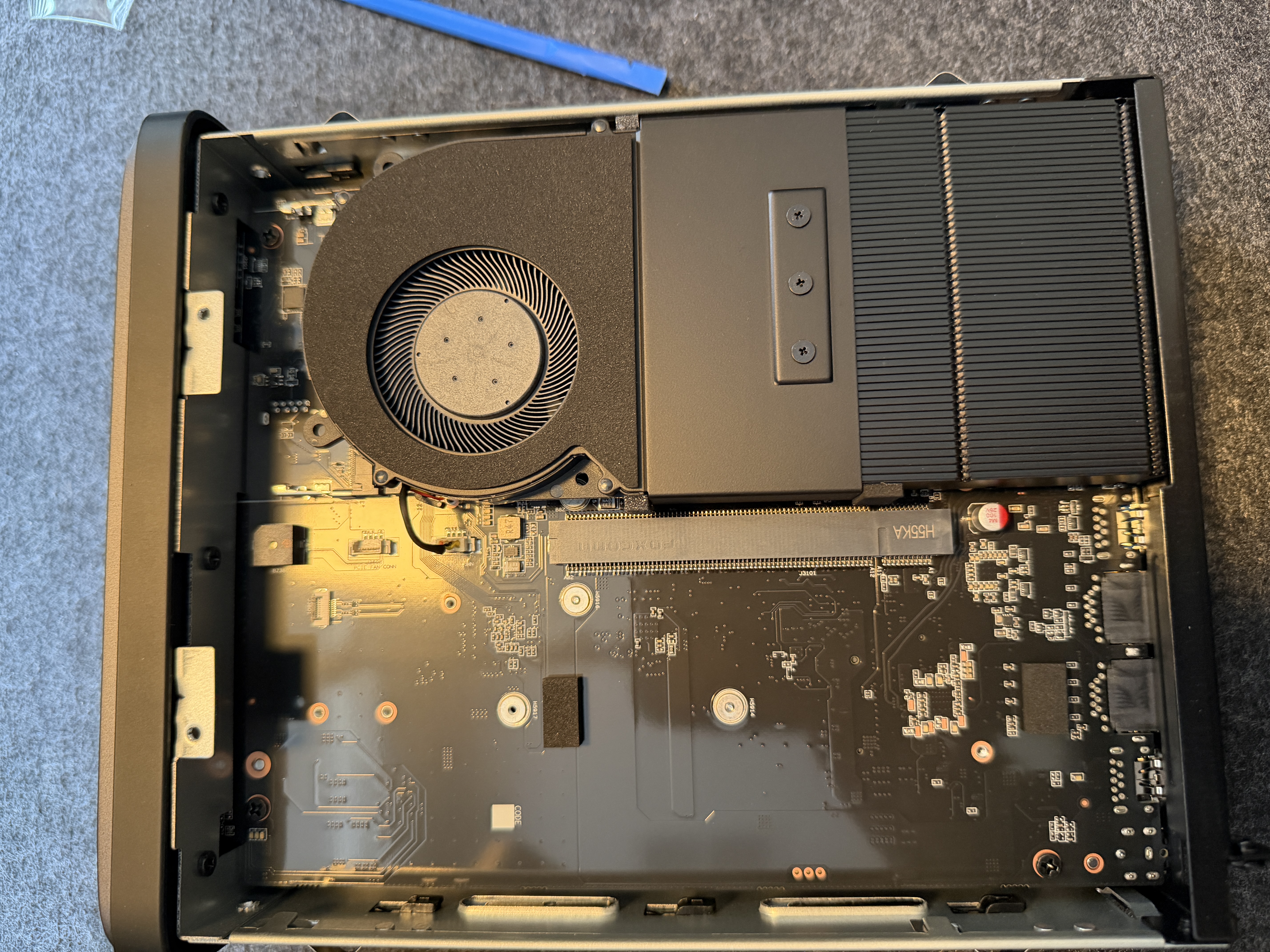
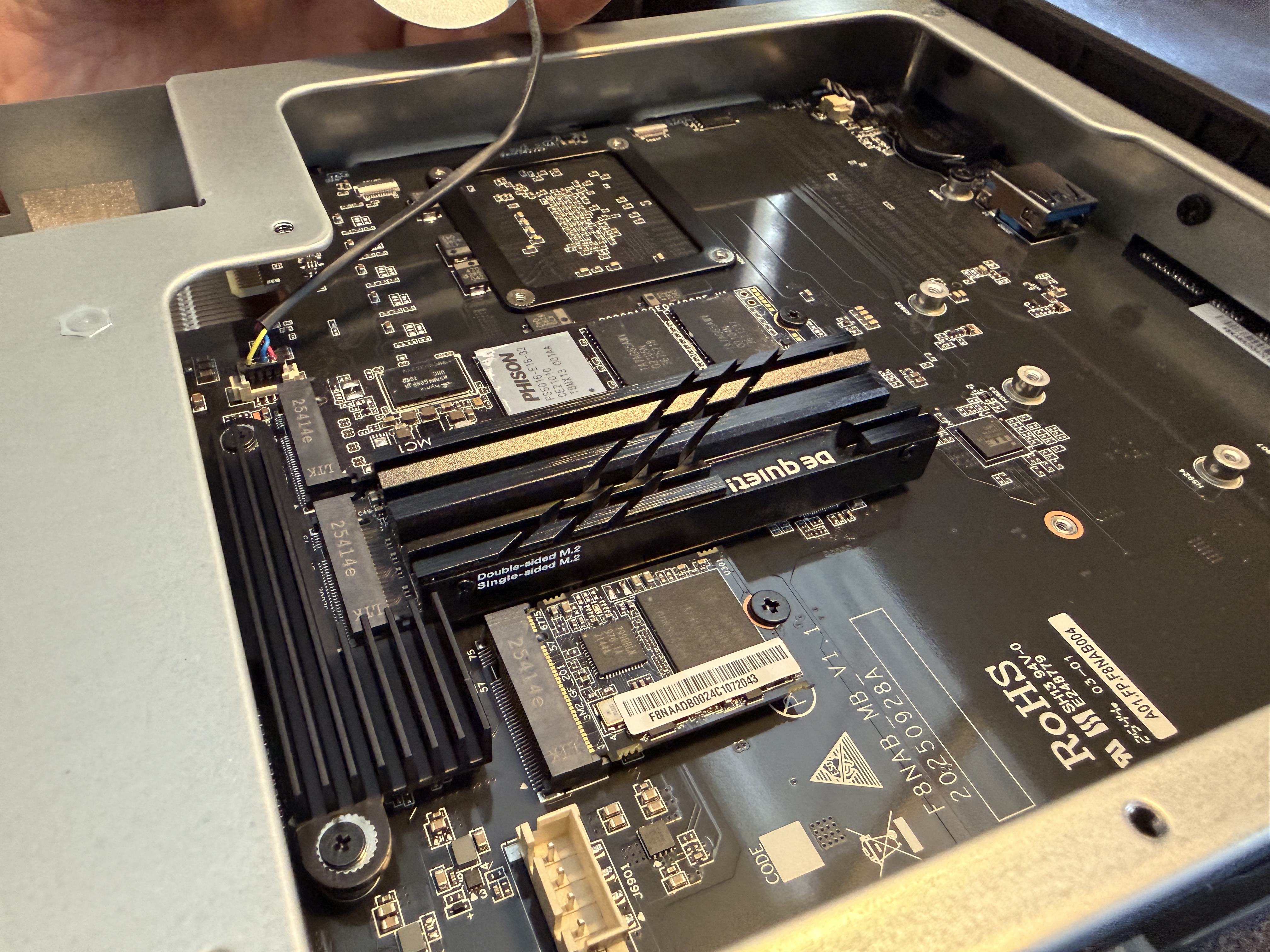
The three M.2 NVMe slots are on the underside of the tray, covered by a small dedicated cooling fan. Third-party NVMe heatsinks like the Be Quiet MC1 fit under this fan with tight but workable clearance. The stock 64GB boot drive occupies one slot and is a short-form M.2 with an eMMC-class controller (BAYHUB Samsung-CJNB4R). It negotiates at PCIe 2.0 x1 and is adequate for booting an OS but nothing more.
NOTE
There is an internal USB 3.2 Gen 2 port on the motherboard. Its purpose is to allow booting from an internal USB drive, freeing all three M.2 slots for data storage if needed.
The PCIe x16 slot accepts half-height, single-slot cards. I tested fitment with an NVIDIA Tesla P4, which filled the slot completely. The AMD Ryzen 7 255 includes a Radeon 780M iGPU with hardware encode and decode support, so a dedicated GPU is unnecessary for media transcoding workloads like Jellyfin or Plex.
Cooling and Noise
Two 92mm rear exhaust fans pull air through the drive cage. They use 4-pin connectors but with a small proprietary form factor, not standard PC fan headers. Replacement fans would need the correct connector. The fans are quiet, and in practice the spinning hard drives produce more noise than the cooling system. The plastic chassis does transmit more mechanical drive noise than a metal enclosure would.
Under a 5-minute all-core CPU stress test, the Ryzen 7 255 reached a maximum of 72C while sustaining 50W package power. No thermal throttling occurred. The cooling solution handles the 45W TDP chip with significant headroom. This is a meaningful advantage for anyone planning to run compute-heavy workloads alongside NAS duties.
NVMe Slot Analysis
The three M.2 slots are not equal, and the manual's claimed lane allocations do not fully match measured behavior. I confirmed this by testing the same NVMe drive in multiple slots:
| Slot | Manual Claim | Measured | Notes |
|---|---|---|---|
| Slot 1 | PCIe 4.0 x1 | PCIe 4.0 x4 | Full speed, better than advertised |
| Slot 2 (boot) | -- | PCIe 2.0 x1 | Stock 64GB eMMC-class drive |
| Slot 3 | PCIe 4.0 x1 | PCIe 4.0 x2 | Confirmed slot-side limitation via drive swap |
The x2 limitation on Slot 3 follows the slot, not the drive. I tested both a PCIe 4.0 (Corsair Force MP600) and PCIe 3.0 (Patriot P320) drive in each slot: both negotiated x4 in Slot 1 and x2 in Slot 3. If you are adding a fast NVMe, put it in Slot 1.
The Ryzen 7 255 has 20 PCIe 4.0 lanes total. The N5 Air exposes many expansion options (3x M.2, OCuLink x4, PCIe x16 at x4, 2x USB4) that collectively could exceed the available lane budget, which likely explains the reduced bandwidth on Slot 3.
Storage Performance
Benchmarked with 5x HGST Ultrastar 7K4000 4TB drives (enterprise drives from 2014, all with zero SMART errors) in a ZFS RAID-Z2 configuration providing 10.9TB usable storage.
ZFS RAID-Z2 Pool (5x HDD, JMicron JMB58x SATA controller)
| Test | Result |
|---|---|
| Sequential Write | 486 MB/s |
| Sequential Read | 405 MB/s |
Solid throughput for a 5-drive HDD array over a JMicron SATA controller.
NVMe Storage
| Drive | Slot | Sequential Read | Sequential Write |
|---|---|---|---|
| Corsair Force MP600 (PCIe 4.0) | Slot 1 (x4) | 2,948 MB/s | 1,255 MB/s |
| Corsair Force MP600 (PCIe 4.0) | Slot 3 (x2) | 2,682 MB/s | 2,470 MB/s |
| Patriot P320 512GB (PCIe 3.0) | Slot 1 (x4) | 2,687 MB/s | 2,076 MB/s |
NVMe performance is strong. The Gen4 drive in the x4 slot delivers nearly 3 GB/s read, well above what the 10GbE network link can consume.
Network Performance
The 10GbE Realtek RTL8127 NIC was tested against a Proxmox server (Supermicro M12) via a Unifi 10GbE switch on the same L2 segment.
| Test | Result |
|---|---|
| Single stream | 8.44 Gbits/sec |
| 4 parallel streams | 9.27 Gbits/sec |
Single-stream performance is solid. Multi-stream approaches full line rate. One important caveat: the RTL8127 requires an out-of-tree driver on Debian 13 (kernel 6.12). The driver builds cleanly from source, but native in-kernel support does not arrive until kernel 6.16. The 5GbE RTL8126 port works with the in-kernel r8169 driver out of the box.
Power Consumption
Measured at the wall using a Shelly Plus Plug US smart meter, cross-validated with AMD RAPL for CPU package power. Note: a Tesla P4 GPU was installed in the PCIe slot during testing, adding approximately 10-15W to idle power.
| State | Wall Power | CPU Package |
|---|---|---|
| Idle (5 HDDs spinning) | 70.3W | 3.8W |
| Idle (HDDs spun down) | 38.2W | 3.9W |
| Full CPU stress | 133.7W | 50.0W |
Without the Tesla P4, the base system idle would be closer to 25-28W with drives spun down, which is very efficient for the amount of processing power available.
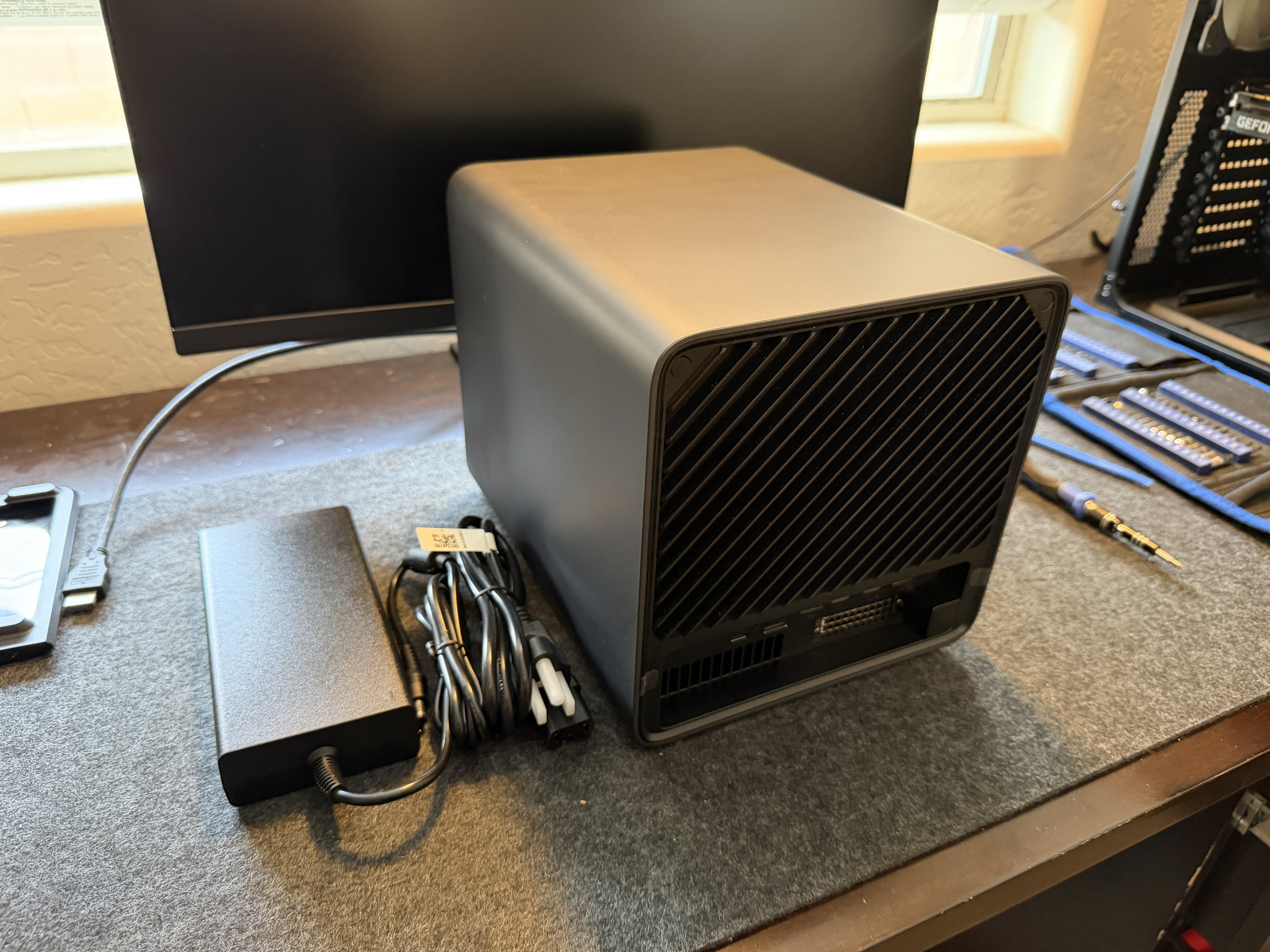
The external DC power brick is functional but adds clutter. A built-in PSU would have been a welcome improvement.
CPU Performance
| Test | Result |
|---|---|
| Single-thread (sysbench) | 2,244 events/sec |
| Multi-thread 16T (sysbench) | 19,482 events/sec |
| Memory read (1M blocks) | 72.8 GB/s |
| Memory write (1M blocks) | 42.0 GB/s |
The Ryzen 7 255 is significantly overpowered for pure NAS duties. This is a processor that can comfortably run Proxmox with multiple containers and VMs while simultaneously serving files over 10GbE. The Radeon 780M iGPU adds hardware media transcoding without needing a discrete GPU.
Thermal Profile
| Phase | CPU (Tctl) | GPU (edge) | RAM | Tesla P4 |
|---|---|---|---|---|
| Idle | 33C | 32C | 37.5C | 53C |
| 15s stress | 67C | 48C | 38.2C | 53C |
| 35s stress | 72C | 52C | 39.2C | 53C |
The CPU sustains 50W at 72C with no throttling. The cooling solution is well-matched to the 45W TDP chip, leaving significant thermal headroom for sustained workloads.
Who Is This For
The N5 Air targets the buyer who wants maximum features and performance per dollar and is willing to accept plastic construction and some design compromises to get there. The barebones price gets you an 8-core Ryzen processor, 10GbE networking, PCIe expansion, OCuLink, USB4, and three NVMe slots. That is a feature list that competes with devices at two to three times the price. Just remember that RAM, drives, and ideally an additional NVMe drive are required purchases on top of the base unit.
It excels as a combination NAS and home server. The Ryzen 7 255 has more than enough power to run Proxmox, Docker containers, Jellyfin, and other services while handling file serving duties. The integrated Radeon 780M handles hardware transcoding without a dedicated GPU.
Where it falls short is the tactile experience. The drive trays are frustrating, the plastic chassis lets more noise through, and the external power brick adds desk clutter. If premium build quality matters more to you than raw specifications, look at metal-chassis alternatives. But if you prioritize what the hardware can actually do over how it feels in your hands, the N5 Air delivers outstanding value for a barebones NAS.
Rack score
| Category | Score |
|---|---|
| Performance | 5 / 5 |
| Features | 5 / 5 |
| Quality | 3 / 5 |
| Design | 3 / 5 |
| Value | 4 / 5 |
Pros
- AMD Ryzen 7 255 delivers strong CPU performance with no thermal throttling (72C under full stress)
- Slide-out motherboard tray makes component access easy with just two screws
- PCIe x16 slot, OCuLink, and USB4 provide extensive expansion options
- 10GbE plus 5GbE dual networking
- 3x M.2 NVMe slots with dedicated NVMe cooling fan
- 70W idle with 5 HDDs spinning, efficient for the hardware
- Internal USB 3.2 Gen 2 port for OS boot to free all M.2 slots
- Strong value for the feature set at the barebones price point
Cons
- Drive trays use interference-fit clips that require excessive force and may wear over time
- Plastic chassis transmits more drive noise than metal alternatives
- M.2 NVMe slots have unequal bandwidth: only slot 1 is full x4, slot 3 is x2, boot slot is Gen 2 x1
- 10GbE Realtek RTL8127 NIC requires out-of-tree driver on current Linux kernels (kernel < 6.16)
- External DC power brick instead of built-in PSU
- Stock 64GB boot drive is eMMC-class, not a real NVMe SSD
- Fans use small proprietary 4-pin connectors, not standard PC fan headers
- Missing factory screw noted on one panel
IMPORTANT
Verdict — The N5 Air packs a surprising amount of power and expandability into a barebones NAS. The Ryzen 7 255 outperforms processors in NAS units costing significantly more, and the cooling keeps it running without throttling. The slide-out motherboard tray is genuinely clever design. Where it falls short is build quality: the plastic chassis, difficult drive trays, and external power brick remind you this is a budget-conscious product. For anyone who prioritizes raw performance, expansion options, and value over premium build quality, the N5 Air is hard to beat.